Evenhold Join early access

Coming to iPhone and Android

Stay close, even when you're far.

Steady help, one tap away.

Evenhold is a family help desk for looking after someone you love. Your loved one gets one calm screen with a few big buttons. The family gets one shared desk to answer scam questions, respond to alerts and see where they are, with their OK.

The preview runs in your browser with sample data. It doesn't call, text or alert anyone.

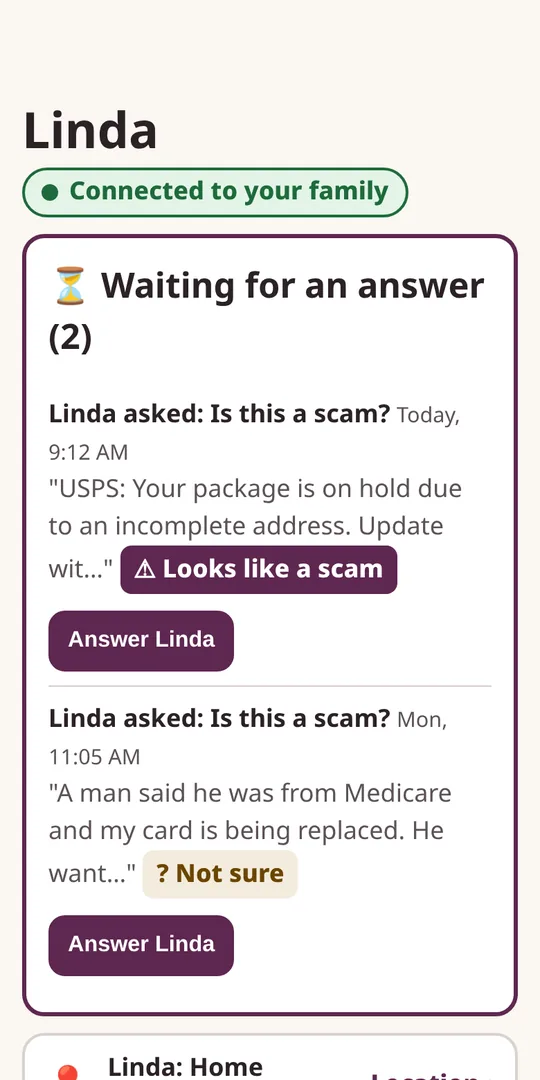
The family's Home screen: two scam questions from Linda are waiting for an answer, and a card shows she is at home, updated 4 minutes ago.
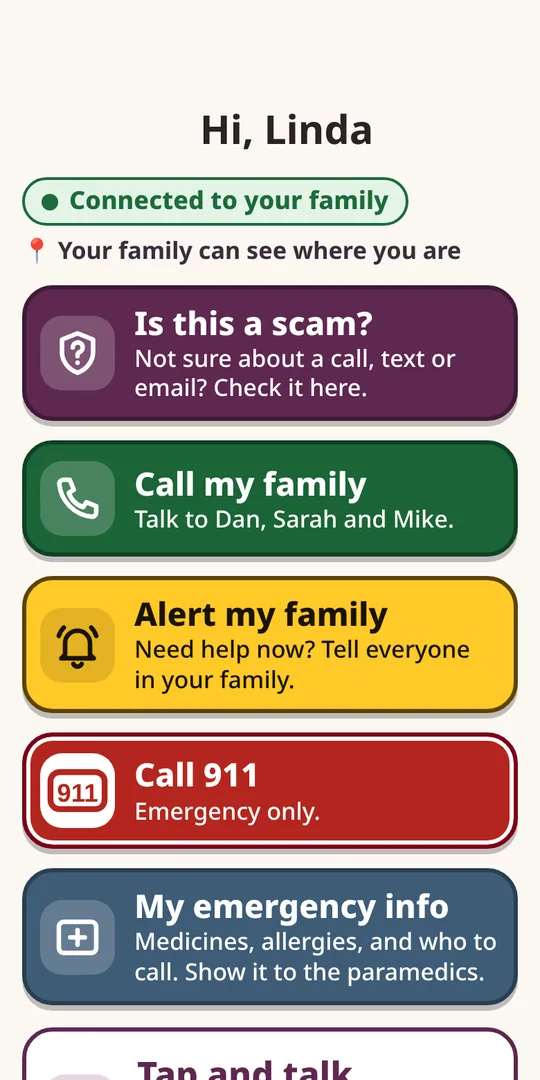
The loved one's screen: big buttons for Is this a scam?, Call my family, Alert my family, Call 911 and My emergency info.
  • Free plan for one loved one
  • Safety basics never behind a paywall
  • Location only with your loved one's OK
  • No passwords stored, ever

Features

Everything the family needs, nothing your loved one has to learn

Many family safety tools focus on monitoring accounts. Evenhold is built for the everyday moments: a strange text, a call that feels off, or a day when your loved one needs help fast.

  • "Is this a scam?" in one tap

    Your loved one sends a strange text, email or call to the family. Whoever is free answers "Let's verify this" with a specific next step, like calling the bank on the number on their card, or "Don't respond."

  • Alert my family

    One button asks first, then lets the family know your loved one needs help. On Free it reaches one family member in the app. On the Family plans it reaches all the caregivers.

  • A calm screen for your loved one

    Large text and one clear button per line. Tap and talk lets them just say what they need. No ads, upgrade offers or sales pop-ups on their screen. Ever.

  • One shared desk

    Caregivers share one Home: what's waiting, open alerts, the safety checklist, the emergency card and who did what. Nobody carries the worry alone.

  • Break-glass sheet

    For the day someone gets locked out of an account. A printable sheet your family fills in by hand together: where things are kept and who to call. It never holds passwords, and Evenhold never stores them.

  • Loud alerts Coming in the app

    In the iPhone and Android apps, alerts are designed to break through vibrate and silent, once a caregiver allows it in setup. Whether an alert sounds still depends on each phone's settings, so we'll include a test alert in setup.

Location, with their OK

Know they got home, without checking in all day

  • The Location tab shows a live map on the Family and Family Plus plans
  • On Free, an alert can include your loved one's last known location
  • Only your loved one can turn it on, from their own screen
  • They can pause it anytime, and the family sees that they paused it
  • It isn't a medical alert and can't promise to catch a fall. It only works when the phone is with them, on and has signal.
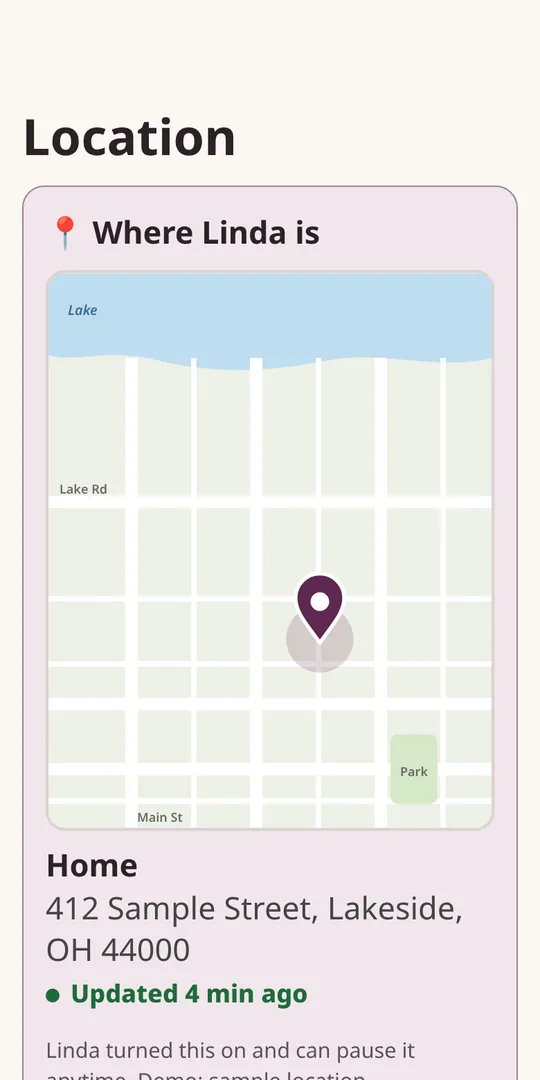
The family's Location tab: a map with a pin showing Linda at home, updated 4 minutes ago, with a note that she turned this on and can pause it anytime.
The Location tab, with sample data

How it works

Set up by the family in minutes

  1. You set it up

    Add your loved one, their emergency info and the family members who help. A step-by-step guide walks you through it.

  2. Your loved one says yes

    Install Evenhold on their iPhone or Android phone and send their personal invite. They open it and tap "Yes, this is my phone." No passwords to remember.

  3. They tap a big button

    • Call 911 asks first, then opens the phone's own dialer.
    • Call my family one tap to call a family member.
    • Alert my family asks first, then lets the family know.
    • Is this a scam? sends a strange message to the family.
  4. The family handles it together

    It lands on the shared desk. Whoever is free answers with a clear next step, and everyone can see it's been taken care of.

Be one of the first families to try it

We're opening Evenhold to a small group of families first.

Join early access

Why we built it

Built by a Navy veteran and dad who is looking after family

Looking after family, especially from a distance, can mean a lot of "is this real?" phone calls, scattered notes, and worry that one person carries alone.

We wanted something simpler: one calm screen for the person you love, and one place where the whole family can help. We believe loved ones deserve to stay independent and feel respected, not watched, and that safety basics should never cost extra.

Our mission

Help families keep their loved ones safe, connected and independent, without making anyone learn complicated technology.

Trust and privacy

Your family's information stays your family's

What the app will keep

  • Your loved one's name and the emergency card you fill in
  • The family members who help, and how to reach them
  • Messages your loved one sends for a scam check, and the family's answers
  • Alerts and a simple activity log of who did what
  • Location, only if your loved one turns it on

What we never see or store

  • Passwords or PINs for any account. There's no password box anywhere in Evenhold.
  • Full Social Security, card or bank account numbers
  • Security question answers
  • Bank or credit accounts. Evenhold doesn't log in to or watch them.

Your loved one stays in charge

  • Location sharing starts only when they say OK on their own screen
  • They can pause it anytime, and the family sees that they paused it
  • No ads or sales pitches on their screen

Evenhold is in preview. Right now the only thing we collect is the email address you enter to join early access. See our privacy policy.

Pricing

Priced for families, not per person

Evenhold isn't open for sign-ups yet, and no payments are taken. These are the prices we're planning.

Always free on every plan: Call 911, Call my family, the emergency card with home address, and Alert my family.

Free

$0

1 loved one

  • Big-button screen for your loved one
  • 5 scam checks a month
  • Alert my family reaches 1 family member in the app
  • Alerts include your loved one's last known location, if they turn it on
  • You plus 1 helper
  • Basic "Who called?" lookup
  • Setup guide and invite links

Family Plus

$8.99/month

or $69/year ($5.75 a month)

Up to 4 loved ones

  • Everything in Family
  • Live location map for each loved one
  • Room for more of the people you look after

Join early access

FAQ

Questions families ask

Does it work on a flip phone?

Not the big-button screen. That part needs an iPhone or Android smartphone. If your loved one has a flip phone or landline, the family can still use the printable emergency card and break-glass sheet, but scam checks, alerts and location need a smartphone.

Does my loved one need to set anything up?

Very little. You set things up from the family side. Your loved one opens the invite you send and taps "Yes, this is my phone." There are no passwords for them to remember. Location sharing is optional, and only they can turn it on.

How is this different from Life360, EverSafe, Carefull or Aloe Care?

Those are well-known services, and each has its own focus, such as family location sharing, watching bank and credit accounts for unusual activity, or a medical alert device. Evenhold is a family help desk: your loved one asks, and the family answers. It doesn't watch bank or credit accounts, it isn't a medical alert or 24/7 monitoring service, and it isn't identity theft insurance. Some families may use Evenhold alongside those services.

Will an alert wake me up if my phone is on silent?

That's the plan for the iPhone and Android apps. Alerts are designed to break through vibrate and silent once you allow it during setup, and setup will include a test alert. We can't promise every alert will sound, because that depends on each phone's settings and permissions. In an emergency, your loved one should always call 911.

Does Evenhold call 911?

No. The Call 911 button asks first, then opens the phone's own dialer, and the call goes through the phone itself. Evenhold doesn't monitor anyone or dispatch help.

Does Evenhold block scam calls?

No. Evenhold helps you turn on your phone carrier's free call filtering, and "Who called?" helps you look up a number. Scam check answers are a first read to help your family decide, not a guarantee.

Is it available now?

Not yet. Evenhold is coming to iPhone and Android, and we'll open it to a small group of families first. You can try the preview in your browser with sample data today.

Early access

Join early access

Leave your email and we'll let you know when Evenhold opens to the first families. No spam, and you can unsubscribe anytime.

Want to look around first? Try the preview.

Evenhold is not an emergency service

Evenhold doesn't monitor your loved one, dispatch help, or contact 911 for anyone. The Call 911 button simply opens the phone's own dialer, and every call goes through the phone itself. In an emergency, always call 911 directly.